ScriZen Logo
  • Product
    • Changelog
    • Roadmap
    • Security
  • Features
  • Solutions
    • For SEO Agencies
    • For In-House Teams
    • For SEO Freelancers
    • For Copywriters
    • For Content Owners
  • Pricing
  • Resources
    • Documentation Hub
    • Support Center
    • FAQ
  • Company
    • About Us
    • Contact Us
Start Free Trial
Popular Search licelicen

Getting Started & Setup

  • What is ScriZen SEO Page Auditor?
  • System Requirements and Installation
  • Activating Your License or Trial
  • First Audit Quick Start
  • How to Start Your First Audit

Core Workflows & Content Rendering

  • Dynamic Rendering and Strict Mobile-First
  • Smart Isolation (Audit Scopes)
  • View Modes (WYSIWYG, HTML, TEXT)
  • Importing Local Offline Files and Protected Pages

Step-by-Step Guides

  • How to Start Your First Audit
  • Generating an Automated SEO Brief
  • How to Edit Meta Tags and Images In-Place
  • Exporting Client-Ready Reports in Excel

Deep Semantics & Analytics

  • Working with Keywords and N-Grams
  • Geometric SEO and Word Stats
  • Data Visualization with Semantic Dashboard
  • Deep Comparative Analysis
  • Semantic Cohesion and Resolving Meaning Gaps

Workspace & Productivity

  • Deep Sessions and Workspace Persistence
  • In-Place Editing (Metadata, Links, Images)
  • Exporting Your Results
  • Automated SEO Briefs

Troubleshooting

  • The metrics look wrong: check Audit Scope first
  • The page looks different in WYSIWYG, HTML, and TEXT
  • Activation and validation errors
  • Network, proxy, and corporate firewall issues
  • Protected staging pages do not load
  • Antivirus and Windows SmartScreen
  • Slowdowns, freezes, or unusual performance
  • Advanced analytical tabs appear empty or weak
  • Crashes and Crash Information
  • Update issues
  • Support bundle: what to send

Licensing & Billing

  • Device Activations and Transfers
  • Validation Checks and Offline Grace Period
  • Renewals, Receipts, and Taxes
  • Refund Policy and License Revocation
View Categories
  • Home
  • Documentation Hub
  • Step-by-Step Guides

How to Edit Meta Tags and Images In-Place

< 1 min read

Overview #

You can fix issues directly inside the app without switching back and forth to your CMS.

Editing Meta Tags #

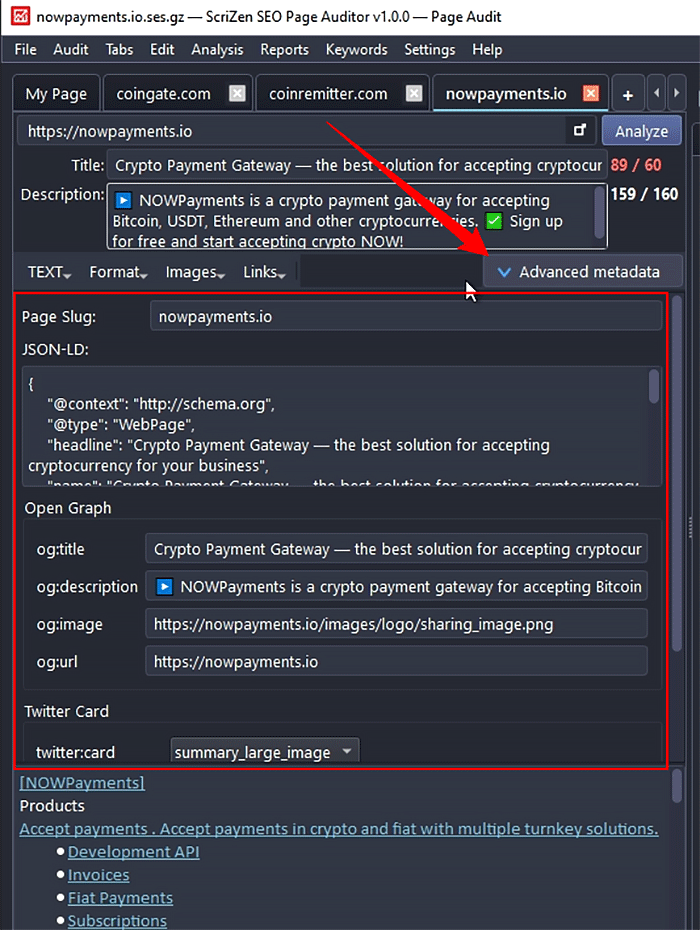
You can edit the Title and Description meta tags directly in the corresponding fields in the left panel of the application.

For advanced metadata editing, use the Advanced Metadata button in the left panel toolbar.


Edit ALT/SRС Attributes #

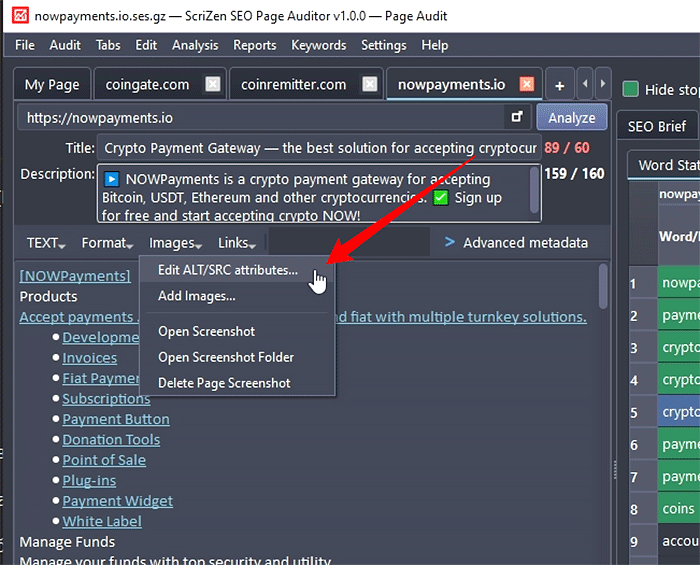
To bulk edit image attributes, use the Images → Edit ALT/SRC Attributes menu in the toolbar:


Bulk Edit Link Anchor Text #

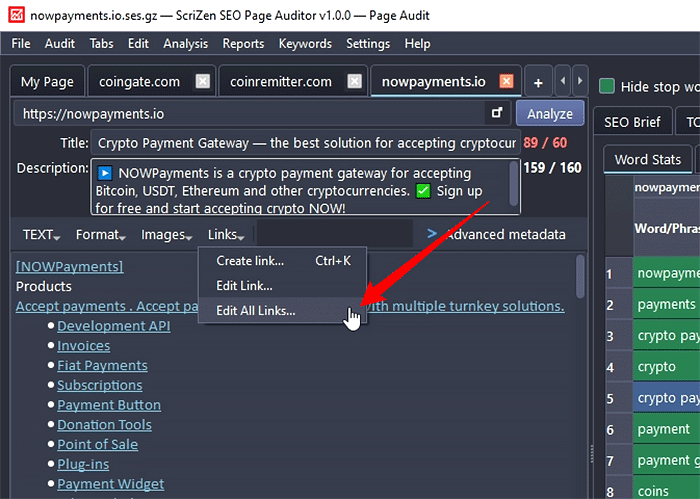
To bulk edit the anchor text of all links on the page, use the Links → Edit All Links menu in the toolbar.


Watch Metrics Recalculate #

After applying edits, all heavy SEO metrics instantly recalculate locally without making server requests. Check your dashboard to see the updated scores.


Updated on April 15, 2026

What are your Feelings

  • Happy
  • Normal
  • Sad
Share This Article :
  • Facebook
  • X
  • LinkedIn
  • Pinterest
Generating an Automated SEO BriefExporting Client-Ready Reports in Excel
Table of Contents
  • Overview
  • Editing Meta Tags
  • Edit ALT/SRС Attributes
  • Bulk Edit Link Anchor Text
  • Watch Metrics Recalculate
ScriZen Logo footer

ScriZen is a professional desktop workspace for deep On-Page SEO analysis. We provide semantic depth with zero cloud limits and 100% local data privacy.

All payments, taxes, and initial refund processing are handled by Paddle, our official Merchant of Record

Products
  • Features
  • Pricing
  • Download
  • Licensing
  • Changelog
  • Roadmap
Solutions
  • SEO Agencies
  • In-House Teams
  • SEO Freelancers
  • SEO Copywriters
  • Content Owners
Resources
  • Documentation
  • Support Center
  • Getting Started
  • Troubleshooting
  • Help & FAQ
Company
  • About Us
  • Security
  • Contact Us

2026 ScriZen. All rights reserved.

  • Terms
  • Privacy
  • EULA
  • Cookie
  • Refund